Changelog
0.1.64a
Changes
- Bumped Firefox from 153.0b5 to 156.0b3
- Fixed a mode switching race condition in the commandline
- Fixed document mirror corruption on stale references
0.1.63a
Changes
- Bumped Firefox from 152.0b2 to 153.0b5
- Added :mode_reset excmd for recalculating the current mode
- Added glide.modes.get()
- Added support for registering custom ignore modes, glide.modes.register('...', { switch_mode_on_focus: false })
- Added support for populating keymap descriptions from the excmd they're mapped to
- Thanks to @suveshmoza for the contribution!
- Fixed glide.process handling of relative PATH entries
0.1.62a
Changes
- Bumped Firefox from 151.0b4 to 152.0b2
- Added support for toggling reader mode on gemini:// pages
- Fixed styling for code blocks on gemini:// pages
- Fixed broken behaviour in :tab_pin_toggle excmd
- Thanks to @suveshmoza for the contribution and @Kazimazi for reporting!
0.1.61a
Experimental support for the gemini protocol
This release adds experimental support the gemini:// protocol. A lightweight, document oriented protocol.
This is experimental as it has not been thoroughly tested, and the full gemini protocol has not been implemented yet.
If you've just installed this version then you can try it out at any of the following sites:
- gemini://geminiprotocol.net
- gemini://midnight.pub
- gemini://bbs.geminispace.org
- gemini://warmedal.se/~antenna/
The default styling is intentionally minimal, you can custommise it however you'd like with glide.o.gemini_styles:
glide.o.gemini_styles = css`
  html {
    margin: 20px;
  }
  body {
    max-width: 800px;
    font-family: serif;
    line-height: 1.6;
  }
  /* ... */
`;
Changes
- Bumped Firefox from 149.0b8 to 151.0b4
- Added support for glide.o.native_tabs = 'autohide' on macOS
- Thanks to @suveshmoza for the contribution!
- Prevented enhanced tracking protection from resetting on restarts
- Thanks to @suveshmoza for the contribution!
0.1.60a
Changes
- Bumped Firefox from 148.0b15 to 149.0b8
- Added AddonInstalled autocmd
- Added glide.commandline.close()
- Added :tab_duplicate excmd
- Added yt normal mode keymapping to duplicate the current tab
- Added <A-p> normal mode keymapping to pin / unpin the current tab
- Thanks to @suveshmoza for the contribution!
- Fixed macOS distribution missing passkey entitlements
- Fixed the :whichkey UI disappearing after reloading the config
- Fixed <C-d> / <C-u> so they actually scroll half pages instead of full pages
- Fixed (hopefully) a race condition preventing the ConfigLoaded autocmd from firing
- Breaking change: the glide.unstable.split_views API now requires numeric IDs
- This was an upstream Firefox change.
0.1.59a
Breaking change: diacritic keymaps on macOS
Previously on macOS if you wanted to define a keymap with the Option key, then you would have to use the diacritic version of the key as macOS uses Option to enable diacritics.
By default Glide will now use the physical key pressed instead of the diacritic, for example:
/// before
glide.keymaps.set("normal", "<A-π>", "tab_pin");

/// after
glide.keymaps.set("normal", "<A-p>", "tab_pin");
For more information see the Key codes docs.
Findbar API
This release includes support for programmatically operating the Firefox findbar. You can now open / close the findbar, and traverse through findbar matches directly from the config.
For example, a keymap that opens the findbar to search for the text that is currently selected:
glide.keymaps.set("normal", "~", async ({ tab_id }) => {
  const selected = await glide.content.execute(
    () => window.getSelection()?.toString(),
    { tab_id },
  );
  if (!selected) {
    throw new Error("No text selected in the page");
  }
  await glide.findbar.open({ query: selected });
});
The full API includes:
- glide.findbar.open()
- glide.findbar.next_match()
- glide.findbar.previous_match()
- glide.findbar.close()
- glide.findbar.is_open()
- glide.findbar.is_focused()
Previous / next link following
This release adds the [[ and ]] default keymappings in normal mode that will automatically follow "previous" and "next" links respectively.
For example, entering ]] while on https://lobste.rs/active will take you to https://lobste.rs/page/2, then [[ will take you to https://lobste.rs/page/1.
This works by searching for link elements (e.g. <a>, <div role="link">) that contain specific text (e.g. "next", "more"). If multiple elements are found, then the element at the bottom of the page is selected.
You can customise the text strings to search for with glide.o.go_next_patterns and glide.o.go_previous_patterns. Or use different keymappings by mapping :go_next and :go_previous.
Customisable keyboard layouts
Added support for resolving keymaps from the physical key pressed instead of whatever key string your software layout resolved it to.
This is particularly important for users with multiple keyboard layouts, as you no longer have to define keymaps multiple times for each layout, e.g.
/// before
// english
glide.keymaps.set("normal", "<C-t>", "tab_prev");
// russian
glide.keymaps.set("normal", "<C-т>", "tab_prev");
You can now tell Glide to use the physical key code instead:
/// after
glide.o.keyboard_layout = "qwerty";
glide.o.keymaps_use_physical_layout = "force";

glide.keymaps.set("normal", "<C-t>", "tab_prev");
Glide still needs a way to map the key code to the corresponding key string in mappings. For example, what should pressing Shift + Digit2 be matched against?
The answer can change depending on your specific keyboard. On a US keyboard with a qwerty layout you would expect it to match against keymaps using @, but on a German keyboard it should be ".
The default keyboard layout is US qwerty. If you use a different layout, see the glide.o.keyboard_layouts option.
Half page scrolling
The <C-d> and <C-u> keymaps now scroll half pages instead of full pages like they did before. This was changed to match Vim behaviour more closely.
Changes
- Bumped Firefox from 148.0b4 to 148.0b15
- Blocked AI link previews by default
- Enabled Firefox's experimental AI controls UI
- Added glide.tabs.unload()
- Added glide.prefs.scoped() for temporarily settings prefs with the new using keyword
- Added DOM.listeners.has() for checking if an element has a specific event listener type registered
- Added support for installing addons in private browsing mode with glide.addons.install('...', { private_browsing_allowed: true })
- Added a --glide-current-mode-color CSS variable for easier mode-specific UI customisation
- Thanks to @45Hnri for the contribution!
- Added :tab_reopen to open the most recently closed tab
- Added the ^ motion in normal mode
- Thanks to @suveshmoza for the contribution!
- Fixed the I motion crossing multiple lines
- Thanks to @suveshmoza for the contribution!
- Fixed (partially) an issue where glide.keys.next() promises could hang around after config reloads
0.1.58a
Experimental windows support
This release adds support for Windows!
This support is marked as experimental as it has not been tested as thoroughly as Linux or macOS. If you run into any issues please report them!
The Windows binaries are not signed yet. This means that Windows will warn you that you're installing an app from an "unknown publisher"; you'll have to click through these warnings if you want to try out Glide on Windows right now.
Changes
- Bumped Firefox from 147.0b8 to 148.0b4
- Added process output helpers, await process.stdout.text(), await process.stdout.lines()
- These will resolve when the process exits, if you want to consume output as soon as it is available you can async iterate instead of awaiting
- for await (const line of process.stdout.lines()) { ... }
- Added support for writing to process stdin with await process.stdin.write("data")
- Thanks @philocalyst for the contribution!
- note: you must call await process.stdin.close() for the process to exit
- Added support for registering event listeners in the browser UI
- e.g. window.addEventListener("click", (event) => { ... })
- Added glide.o.newtab_url for customising the newtab page
- Added glide.fs.mkdir()
- Added Addon.reload() for reloading an installed addon
- Added Addon.type for identifying the type of an addon, e.g. extension, theme, etc
- Added yf keymapping to copy the href of an element to the clipboard
- Thanks @suveshmoza for the contribution!
- Added auto_activate: "always" to glide.hints.show() for always activating the first hint found, instead of only auto activating when there is a single hint found
- Promoted glide.unstable.include() to glide.include()
- note: glide.unstable.include() still exists for backwards compatibility but it will be removed in a future release
- Fixed calling glide.commandline.show() within an excmd
- Fixed the commandline not closing immediately if an excmd takes a long time to complete
- Fixed expanding ~ in the process cwd, e.g. glide.process.execute("pwd", [], { cwd: "~/.dotfiles" })
- Thanks @suveshmoza for the contribution!
- Fixed errors while reloading the config from potentially corrupting internal state
- docs: added table of contents sidebar to reference pages
- Thanks @suveshmoza for the contribution!
- docs: fixed clashing /tutorial pages
0.1.57a
Search engine configuration
You can now configure new search engines directly in the Glide config, for example:
glide.search_engines.add({
  name: "Discogs",
  keyword: "disc",
  search_url:
    "https://www.discogs.com/search/?q={searchTerms}",

  // optional
  favicon_url: "https://www.discogs.com/favicon.ico",
  is_default: false,
});
With this example you could search using Discogs by focusing the address bar and typing disc<space>!
The glide.search_engines.add() function takes the same arguments as the chrome_settings_overrides.search_provider web extension manifest v2 object.
Changes
- Bumped Firefox from 147.0b3 to 147.0b8
- Improved type inference for glide.content.execute() params
- Thanks @TomerAberbach for the contribution!
- Added support for hiding the native tab bar with glide.o.native_tabs = "hide", or with "autohide" to show the tab bar on hover on Linux
- Thanks @45Hnri for the contribution!
- Added glide.styles.has()
- Added glide.styles.get()
- Added support for overwriting existing styles with glide.styles.add('css', { id: '...', overwrite: true })
- Added :tab_pin and :tab_unpin commands
- Thanks @suveshmoza for the contribution!
- Updated :config_reload to apply across all open windows
- Updated the commandline to show suggested commands first
- Thanks @jyn514 for the contribution!
- Updated hint generation to clear previous "No hints found" notifications when hints are eventually found
- Thanks @suveshmoza for the contribution!
- Removed Perplexity as a default search engine
- Fixed usage of the browser API on privileged pages
- Fixed permissions error when creating or updating tabs with a privileged URI, e.g. browser.tabs.create({ url: "resource://glide-docs/index.html" })
- Fixed glide.bo.hint_size so that it correctly applies the styling for the current buffer
- Fixed i sending an unnecessary <left> key event
- Fixed serialisation of the browser.contentScripts.register() return value. You can now access it, and call script.unregister().
- Misc
- Many thanks to @jyn514 for updating lots of docs and improving the contributing experience!
- Set up a Zulip chat for realtime discussion
- Reduced the number of redundant DOM mutations inside the commandline
- Thanks @suveshmoza for the contribution!
0.1.56a
Breaking changes
Hint callback execution
The action and pick callbacks are now executed in the main process, not the content process. This change was made so that you can access the glide API in the callbacks, making them much more useful.
For example, only selecting the hint with the largest width:
// before
glide.hints.show({
  pick: (hints) => {
    let biggest_hint = hints[0]!;
    let biggest_width = hints[0]!.element.offsetWidth;
    for (let i = 1; i < hints.length; i++) {
      const hint = hints[i]!;
      const width = hint.element.offsetWidth;
      if (width > biggest_width) {
        biggest_hint = hint;
        biggest_width = width;
      }
    }
    return [biggest_hint];
  },
});

// after
glide.hints.show({
  pick: async ({ hints, content }) => {
    const widths = await content.map((element) =>
      element.offsetWidth
    );
    let biggest_hint = hints[0]!;
    let biggest_width = widths[0]!;
    for (let i = 1; i < hints.length; i++) {
      const hint = hints[i]!;
      const width = widths[i]!;
      if (width > biggest_width) {
        biggest_hint = hint;
        biggest_width = width;
      }
    }
    return [biggest_hint];
  },
});
For the action function:
// before
glide.hints.show({
  action: (element) => {
    element.click();
  },
});

// after
glide.hints.show({
  action: async ({ content }) => {
    await content.execute((element) => element.click());
  },
});
Relative path resolution
Previously calls to APIs like glide.fs.read() with relative paths would resolve relative to the config file instead of the current file.
For example:
// <config>/glide.ts
glide.unstable.include("foo/bar/stuff.glide.ts");

// <config>/foo/bar/stuff.glide.ts
glide.fs.read("data.json");
0.1.55a would read <config>/data.json
0.1.56a will now read <config>/foo/bar/data.json
Custom hint label generators
You can now override label generation for hints to use whatever strategy you'd like.
For example, a very naive implementation for using the first two characters of the element text as the label:
glide.hints.show({
  label_generator: async ({ content }) => {
    const texts = await content.map((element) =>
      element.textContent!
    );
    return texts.map((text) => text.slice(0, 2));
  },
});
Thanks to @peff for the contribution!
Changes
- Bumped Firefox from 146.0b9 to 147.0b3
- Added support for nested glide.unstable.include() calls
- Added glide.modes.list()
- Added glide.commandline.is_active()
- Added support for overriding commandline custom option matching so you can bring your own fuzzy finder
- Added <CR> keymapping to accept the hint with typed label
- This is helpful for custom label generator functions that may define labels with the same prefix
- Thanks to @peff for the contribution!
- Added support for DOM.create_element() in the content process
- Fixed glide.o.switch_mode_on_focus disabling certain non-focus mode changes
- Fixed keymap types to correctly allow <leader>-, <<, < and other similar sequences
- Thanks to @suveshmoza for the contribution!
- Fixed repeated glide.styles.remove() calls with the same ID
- Fixed glide.styles.add() erroneously adding duplicate styles
- Fixed static properties / methods on builtin classes not being accessible, e.g. URL.canParse()
- Fixed GlideProcessError not being exposed to the sandbox
- Fixed glide.hints.show() with auto_activate: true not respecting action: () => ...
- Fixed elements returned by commandline options render() functions from being needlessly duplicated, and breaking references
0.1.55a
Picker API
You can now use the commandline as a picker for arbitrary options.
For example, creating a basic version of :tab that only shows bookmarks:
glide.keymaps.set("normal", "<leader>o", async () => {
  const bookmarks = await browser.bookmarks.getRecent(10);

  glide.commandline.show({
    title: "bookmarks",
    options: bookmarks.map((bookmark) => ({
      label: bookmark.title,
      async execute() {
        const tab = await glide.tabs.get_first({
          url: bookmark.url,
        });
        if (tab) {
          await browser.tabs.update(tab.id, {
            active: true,
          });
        } else {
          await browser.tabs.create({
            active: true,
            url: bookmark.url,
          });
        }
      },
    })),
  });
}, { description: "Open the bookmarks picker" });
You can also customise how each option is displayed by providing a render() function on each option that returns a HTMLElement:
{
  label: bookmark.title,
  render() {
    return DOM.create_element("div", {
      style: {
        display: "flex",
        alignItems: "center",
        gap: "8px",
      },
      children: [
        DOM.create_element("span", [bookmark.title]),
        DOM.create_element("span", [bookmark.url], {
          style: { color: "#777", fontSize: "0.9em" },
        }),
      ],
    });
  },
};
See the full commandline docs for more information.
Split views API
This feature is very early in development in Firefox, there will be bugs.
Firefox has work in progress support for split views, so you can view multiple tabs at the same time.
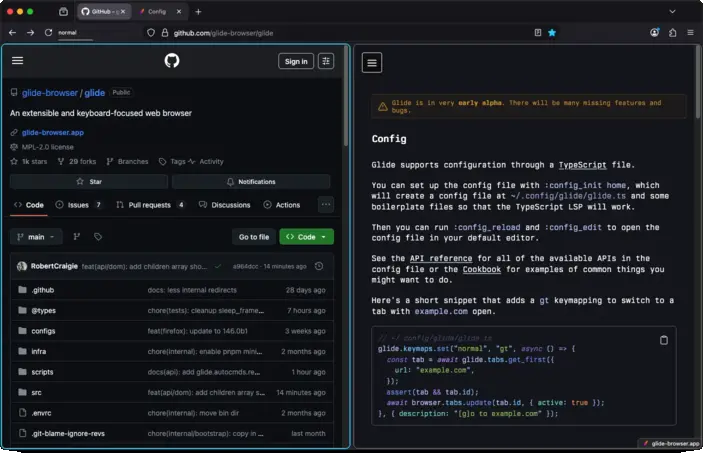
You can now manage split views directly from the Glide config with glide.unstable.split_views, for example:
glide.keymaps.set(
  "normal",
  "<C-w>v",
  async ({ tab_id }) => {
    const all_tabs = await glide.tabs.query({});
    const current_index = all_tabs.findIndex((t) =>
      t.id === tab_id
    );
    const other = all_tabs[current_index + 1];
    if (!other) {
      throw new Error("No next tab");
    }
    glide.unstable.split_views.create([tab_id, other]);
  },
  {
    description:
      "Create a split view with the tab to the right",
  },
);

glide.keymaps.set(
  "normal",
  "<C-w>q",
  async ({ tab_id }) => {
    glide.unstable.split_views.separate(tab_id);
  },
  {
    description: "Close the split view for the current tab",
  },
);
Changes
- Bumped Firefox from 146.0b4 to 146.0b9
- Added gU keymapping to go to the root of the current URL hierarchy
- Added gu keymapping to go up the URL hierarchy
- Added CommandLineExit autocmd
- Added glide.commandline.show()
- Added support for removing autocmds with glide.autocmds.remove()
- Added glide.content.fn() for marking callbacks as executing in the content process, currently supported in glide.keymaps.set() and glide.excmds.create()
- Added glide.o.switch_mode_on_focus for disabling automatic mode switching
- Added children syntax sugar to DOM.create_element() so you can now do DOM.create_element('div', ['child'], { ...props })
- Made the glide.o type extensible
- Fixed glide.keys.send() potentially resulting in out-of-order key events
- Fixed the glide.o.yank_highlight type to allow rgb(255, 255, 255) strings
0.1.54a
Page navigation keys (h, j, k, l, <C-u>, <C-d>, gg, and G) are now translated into equivalent standard keys:
- hjkl to arrow keys
- <C-u> to <PageUp>
- <C-d> to <PageDown>
- gg to <D-Up> on macOS, and <C-Home> on Linux
- G to <D-Down> on macOS, and <C-End> on Linux
For example, when you press j, Glide will now send an <ArrowDown> event to the web page.
This change was made for a couple reasons:
- We get to leverage Firefox's smooth scrolling implementation.
- The aforementioned keys are now more likely to just work as you'd expect. Scrolling in PDFs now works; websites with their own scrolling behaviour will now work, as long as they support standard navigation keys.
Website key events
There is a notable behaviour change here now that navigation keys send key events to the web page; websites can now intercept those key events and function differently. This may or may not be desirable depending on the website you are using.
If this behaviour is worse for you, please open a discussion, and if needed you can revert to the previous implementation with:
glide.o.scroll_implementation = "legacy";
This behaviour can be worse when custom elements are focused, e.g. YouTube videos as j will turn the volume down when you really want to scroll the page.
In these cases you can try pressing <C-,> first to move focus off of that element.
Smooth scrolling
Smooth scrolling is now supported, and enabled by default.
If you want to keep instant scrolling you can use this config:
glide.prefs.set("general.smoothScroll", false);
Note that this also changes the scroll behaviour when using arrow keys directly.
Changes
- Bumped Firefox from 145.0b6 to 146.0b3
- Added I motion support
- Added <C-,> to move focus out of the currently active element
- Added :copy excmd for smoother integration with excmds like :profile_dir
- Added support for removing browser styles with glide.styles.remove()
- Added opt-in support for hinting elements with click listeners
- See #110 for more information
- Added glide.ctx.version for accessing the current Glide version
- Added glide.ctx.firefox_version for accessing the Firefox version that Glide is based off of
- Added opt-in JPEG XL support
- Thanks to @SED4906 for the contribution!
- Removed relative path limitations in glide.unstable.include(), you can now pass absolute paths
- Fixed scrolling while editable elments are focused, e.g. <C-d> will now actually scroll the page down.
- Fixed org.mozilla references in DBus names on Linux, we now use app.glide_browser instead
- Thanks @thomascft for the contribution!
- Fixed a case where Glide would automatically exit ignore mode when switching tabs
- Fixed keymappings conflicting with browser UI modals, e.g. <D-q> on macOS / <C-S-w> on Linux
- Updated :clear to also dismiss app menu notifications, e.g. the "New update available" notification
- Disabled more AI prefs
- We now store the previous Glide versions you've used in the profile directory
0.1.53a
Addons API
You can now install addons directly from the Glide config:
glide.addons.install(
  "https://addons.mozilla.org/firefox/downloads/file/4598854/ublock_origin-1.67.0.xpi",
);
This will install the uBlock Origin addon, if it isn't already installed. If you want to install the addon even if it's installed already, use glide.addons.install('...', { force: true }).
glide.addons.install() expects a URL for an XPI file, you can obtain the XPI URL from an addons.mozilla.org page by right clicking on "Add to Firefox", and selecting "Copy link".
Styles API
You can now easily inject custom CSS into the browser UI directly from the Glide config:
glide.styles.add(css`
  #TabsToolbar {
    visibility: collapse !important;
  }
`);
This particular example hides the horizontal native tabs toolbar, but you can customise essentialy anything in the browser UI with this method.
Note that prior to this release you could inject custom CSS yourself but it was slower and would be persisted between config reloads.
Old API
glide.autocmds.create("WindowLoaded", () => {
  document.head!.appendChild(DOM.create_element("style", {
    textContent: css`
      #TabsToolbar {
        visibility: collapse !important;
      }
    `,
  }));
});
Changes
- Bumped Firefox from 144.0b9 to 145.0b6
- Enabled WebAuthn on macOS
- Added glide.addons.install()
- Added glide.addons.list()
- Added glide.styles.add()
- Added glide.o.hint_chars
- Fixed the source tarball, it now includes hidden files
- Fixed hint label generation so that keymaps defined in hint mode do not conflict with labels
- Thank you to @jacobzim-stl for the contribution!
- Fixed missing hints for elements across shadow roots
- Fixed glide.ctx.url so that it is constructed in the correct JS realm
- Fixed the commandline stealing focus even after it was closed
0.1.52a
- Bumped Firefox from 144.0b8 to 144.0b9.
- Fixed synthesizing special keys, e.g. glide.keys.send("<down>").
- Fixed the font family for hints, it now falls back to monospace instead of serif.
- Fixed locale fetching, you can now download locales other than en-US in the settings page.
- Fixed incorrect "new update" notification under certain conditions.
- Fixed passing arguments to custom excmds from the commandline.
- Fixed some web extension method return types to indicate a Promise is returned.
- Fixed tab commandline not always focusing the first tab.
- Enabled loading unsigned extensions when the xpinstall.signatures.required pref is set.
- Enabled WebAuthn on Linux.
- Enabled access to missing Web Extension APIs, tabGroups, activityLog, geckoProfiler, and networkStatus.
- N.B. these APIs haven't all been tested fully yet, so they may not work as expected. Prior to this release, you could not use them at all.
- Added glide.tabs.query() as an alias to browser.tabs.query() for better discoverability.
- Thank you @roceb for the contribution!
- Added keymaps to the commandline UI, so you can easily identify what commands are mapped to.
- Thank you to @jacobzim-stl for the contribution!
- Disabled the AI chat button in the context menu.
0.1.51a
Breaking changes
On Linux, the <C-l> and <C-h> mappings, to go backwards and forwards in history, have been changed to <A-l> and <A-h> respectively.
This change was made to prevent a conflict with the default <C-l> keymap in Firefox that focuses the address bar.
Changes
- Bumped Firefox from 144.0b5 to 144.0b8.
- Fixed keymap autocompletion for glide.keymaps.del().
- Fixed bad handling of invalid focusin events.
- Added <C-[> in insert, visual, and op-pending mode to switch back to normal mode.
0.1.50a
- Added glide.fs.stat().
- Added glide.env.get(), glide.env.set(), and glide.env.delete(). This is particularly useful for configuring your PATH on macOS.
- Added some missing types to the API docs.
- Bumped Firefox from 144.0b5 to 144.0b6.
- Fixed mappings with shift and multiiple modifiers, e.g. cmd+shift+c now works.
- Fixed the native messaging runtime path, previously the paths were the Firefox defaults now:
- macOS system: /Library/Application Support/Glide Browser
- macOS user: ~/Library/Application Support/Glide Browser
- Linux system: /usr/lib64/glide-browser (or /usr/lib/glide-browser)
- Linux user: ~/.glide-browser
- Removed support for the browser API inside the hints content callbacks, e.g. glide.hints.show({ pick: () => ... }). This was the only place it was accessible and allowing access to the browser API from the content frame has security implications that need to be investigated further.
0.1.49a
- Fixed a case where dev tools autocomplete could stop working
- Changed glide.ctx.url from a string to a URL
- Bumped Firefox from 144.0b3 to 144.0b5
0.1.48a
- Updated the recommended tsconfig to more accurately reflect reality
- Added support for setting attributes using DOM.create_element()
- Added glide.fs.write(path, contents)
- Added window to the config sandbox
- Cleaned up the document mirror in the config sandbox
- <browser> and <scripts> elements are no longer included
- Fixed race conditions when mutating the document
- Added many missing elements
0.1.47a
- Fixed a case where the browser toolbox devtools could crash
- Fixed issues with certain functions not being callable in the config, e.g. setTimeout()
- Prevented timers from being throttled, namely setTimeout(), setInterval() and requestIdleCallback()
- Fixed requestAnimationFrame() never firing
- Added glide.fs.exists(path)
- Upated Firefox from 144.0b1 to 144.0b3
0.1.46a
- Added glide.fs.read(path, encoding)
- Added glide.process.spawn(command, args, opts)
- Added glide.process.execute(command, args, opts)
0.1.45a
This release fixes a regression with the document mirror causing a crash when multiple windows are opened.
0.1.44a
This release restructures how the config sandbox is evaluated. Previously, it was possible to access the internal Document and ChromeWindow that Firefox uses to render the browser UI itself. This is useful for accessing DOM APIs, e.g. URL, and allowing you to modify the UI in any way you want, however it introduces security concerns as all of the Glide and Firefox internals can be accessed directly, effectively nullifying the sandbox.
Now, we create a hidden Window and a Document that is a bi-directional mirror of the internal browser UI Document. This lets you modify the Document however you'd like using standard DOM APIs while maintaining isolation from the internals.
Firefox has been bumped from 143.0b9 to 144.0b1, the Firefox release notes can be found here.
0.1.43a
This release is mostly minor docs changes and an internal rehaul of the build system.
0.1.42a
Initial public release!